Friday, May 8, 2009

Calc Pro 2.7.2 & 2.7.3 Released


We have new releases of Panoramic Calc Pro. 2.7.3 was releases immediately after 2.7.2 and fixes a bug with Calc Pro's application icon. Its not an essential update but you'll probably want it for ascetic reasons.

2.7.2 contains some major updates, however these new features and updates probably won't be used by most of our users (my self included).

Better handling of inputting and calculating values in Degrees/Minutes/Seconds. As you can see in the screenshot, Calc Pro will now properly format and handle values in DMS. Numbers can easily be converted between decimal and degrees from the Scientific calculator.

Multi line display for the R.P.N. calculator mode. As you can see in the screenshot we now show two lines of the stack instead of one. For owners of wide screen devices - you'll see 3 lines of the stack when your calculator is in portrait mode.

Better viewing of the RPN stack. You can tap on the low right area of the display to show the values currently in the stack. Its now displayed in a finger friendly list instead of simple message window.

Added Base3, 4, 5, & 12 support the Base Conversions calculator. This is mostly of academic interest but it doesn't take away from any of the other features so we felt it was a worthy addition.

Added the ability to save images of the graph from the graph screen (2.7.1). Also added the ability to chose the name and location of the bitmap to be saved.

Increased the spacing on the menus for wide screen devices in portrait mode to make them easier to use with your fingers.

And as usual we've continued to make minor improvements in the calculator logic and with the button layouts.


Grab the latest version here:
http://www.windowsmobilecalculator.com/

Monday, April 13, 2009

Panoramic Calc Pro updated to v2.7.0


Panoramic Calc Pro 2.7.0 has now been released. It contains a number of minor tweaks and adjustments. If you own a square screen Windows Mobile phone you'll likely notice the improved button spacing.

The new version also includes several additions to the Unit Converter which now includes an "Acceleration" section. Anyone that's needed to converter feet per second squared to meters per second squared in a physics class will appreciate the addition.

This version also includes a new skin which you can see in the screenshots.

As usual you can get it from http://www.windowsmobilecalculator.com/


We're already working on version 2.7.1. Expect some RPN display improvements as well as layout upgrades for "wide" devices in portrait mode such as the Sony Xperia, the Samsung Omnia and the HTC Touch HD.

Friday, April 10, 2009

iSS Software updates: CalcSuite, Essentials, & SciCalc

Implicit Software Solutions Inc has made several updates to several of its Windows Mobile products.

iSS SciCalc has been updated to version 3.0.4 and contains a number of minor bug fixes. As a result, Calc Suite has been updated to 5.0.1 and includes the new version of iSS SciCalc.

iSS Essentials also gets the new version of SciCalc but also receives updates to iSS Notepad & iSS Explorer Pro.

For more information please visit http://www.implicitsoftware.com/

Thursday, April 9, 2009

Panoramic Software on Twitter


Panoramic Software Inc is now using Twitter to make it easier to keep track of Panoramic related news and product releases.

This is a great way to ensure you always know when updates are made to any of our products.

Follow Panoramic here:
https://twitter.com/PanoramicSoft

Wednesday, April 8, 2009

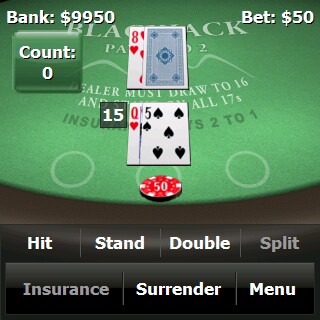
Panoramic BlackJack Review at TreoCentral.com

Panoramic BlackJack for Windows Mobile 5.0, 6.0, 6.1, & 6.5 TreoCentral.com Award of Excellence for Panoramic BlackJack

Jennifer Chappel, a reviewer and Palm enthusiast at http://www.treocentral.com/ has taken the time to review Panoramic BlackJack 1.0.1.

You can read the review here:
http://treocentral.com/content/Stories/2514-1.htm

The review is very favorable which of course puts smiles on our faces but my favorite quote from the review is:
"I've learned a lot about playing Blackjack playing Panoramic BlackJack" which was a major focus when creating this game.


Panoramic BlackJack is available for all Windows Mobile 5.0 and newer devices and supports all screen sizes. The latest version is 1.0.5 at the time of writing this post.

Monday, April 6, 2009

Panoramic Calc Pro gets some graphing improvements

Panoramic Calc Pro 2.6.8 - graphing calculator for Windows Mobile

I was helping a friend with a few grade 12 math problems and I thought it was the perfect opportunity to put the graphing abilities of Calc Pro to use.

I'm happy to report that it worked great but I also realized there was some room for improvement for both entering graph equations and navigating the graph display.

With that in mind we made the following improvements to Calc Pro in version 2.6.8
  • onscreen zoom buttons for the graph (see screenshot)
  • reduced minimum bounding box when in zoom mode - ie - you can drag out a smaller rectangle it will still zoom
  • smarter equation entry - the text size automatically reduces and the equations will now scroll to the right if the equation won't fit in the display.

As usual - grab the latest version from www.windowsmobilecalculator.com

And you can always upgrade your paid version by installing the latest trial overtop.

Saturday, March 28, 2009

Treo Pro done right

I just thought I'd show everyone how I have my Treo setup just in case anyone is looking for ideas, suggestions or recommendations.

I'll start at the top and work my way down:

iSS Battery Meter: that's the rainbow colored bar at the top. It takes up almost no system resources and never gets in the way: battery monitoring made easy.

Panoramic Phone Genius: this configurable today screen plugin works really well. Starting from the top left the icons are:

  • phone profile (to control ringing on incoming calls)
  • e-mail
  • missed calls
  • SMS
  • voicemail
  • today screen settings
  • communication settings
  • favorite contacts (Panoramic Contacts Genius)
  • Panoramic Launcher (beta - not yet released)
  • camera
  • Panoramic Calc Pro
  • clock & alarm settings

Next is Calendar+. This is an open source project I found a few years ago that I've updated to properly support 128 DPI devices. Let me know if you'd like a copy of this version. It's a great plugin that behaves like the default calendar plugin but allows you to show multiple appointments. Its also very configurable it terms of layout and appearance.

And finally, Fizz Traveller. This layout is a custom one I created to properly fit 4 days of weather on the 320x320 screen. Again, I'll be happy to provide it upon request.

Not seen:

I have iSS Task Switcher running and avaliable by tap & hold on the top right-hand corner of the screen. Also launchable by pressing shift-ok.

I also have iSS Explorer Pro set up as a quick launch by pressing shift and the windows button.

All of the retail applications are available at http://www.wireless-apps.net/

And I highly recommend the Palm Treo Pro - this is the best Windows Mobile touch-screen device I've ever owned.