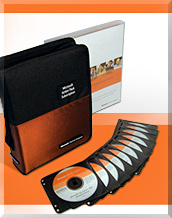
I recently updated my subscription to Microsoft Action Pack and I thought now would be the perfect time to tell others a bit about it.
The quick story is - Microsoft will license you thousands of dollars of software for your company's internal use for a few hundred dollars a year.
The intial price to start is slightly higher than the subscription fee - when we signed up it was $350 US or $450 Canadian with an update fee of $300 a year.
What you get for your money is 10 licenses of Microsoft's latest OS - in the case Vista Professional. You also get 10 licenses of Microsoft Office. Beyond that you get access to almost every Microsoft application you can think of (excluding development tools).
Microsoft will also send you updates every month or two as new products become avaliable.
If you consider the cost of a single license of Vista Professional and a single copy of Office Professional 2007 you quickly realize this a great deal.
What's the catch? Well - technically you're supposed to renew your subscription every year or stop using the software. However we did let ours laps for about 12 months and everything continued to work correctly.
You also are NOT allowed to sell or distribute the software. Its for internal use only.
And you must sign up to be Microsoft Partner - however this is takes no more than 10 minutes.
We originally signed up to simply get Windows XP and Office, but quickly realized that having extra software like Microsoft's Small Business Server and the web development tools would also be very useful. And the SMB costs more than a single year of the Action Pack Subscription.
Take a look and take advantage if you're searching for a cost effective way to use Microsoft's software. You no longer have an excuse for using "borrowed" copies in your office or home office.


